
Explore Grok 4.5: Free chat · Model · Features · API · Pricing · How to use · Use cases · vs GPT-5 · vs Claude
Grok 4.5 API: A Practical Guide to xAI’s Model (Key, Endpoint, Pricing & Code)
The Grok 4.5 API is xAI’s developer endpoint for its strongest model to date, covering access, the OpenAI-compatible endpoint, pricing, and a working code example. If you just want to try the model without writing code, use the free Grok 4.5 chat on this site; if you’re building an app, read on.
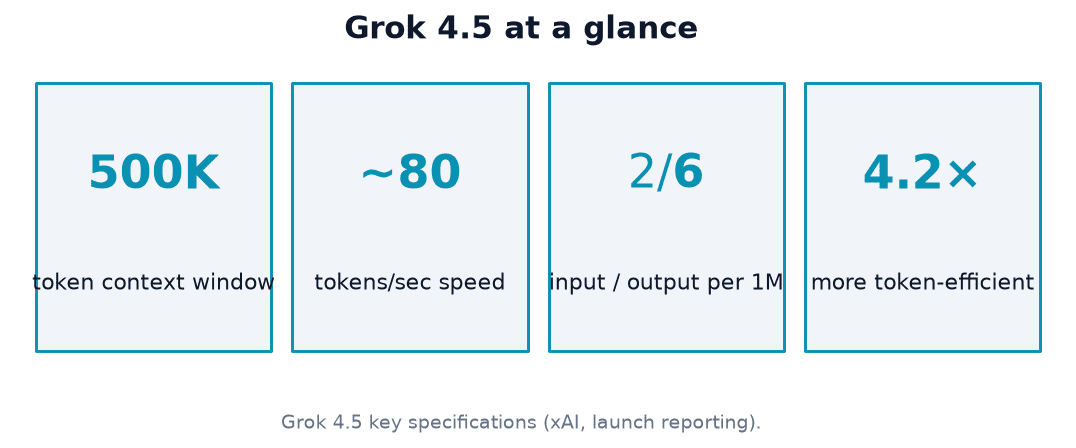
Call it at https://api.x.ai/v1 with an API key, using model id grok-4.5. It’s OpenAI-SDK-compatible, has a 500,000-token context window, and is priced at $2 / $6 per million input / output tokens.
What the Grok 4.5 API is
Grok 4.5 is xAI’s flagship model, branded xAI, released July 8, 2026, built for coding, agentic tasks, and knowledge work. It accepts text and image input and returns text output, and it was built with a strong focus on developer tooling and agentic coding workflows.
xAI’s smartest model built to excel at coding, agentic tasks, and knowledge work.
xAI, Introducing Grok 4.5
The model in one paragraph
Grok 4.5 is positioned as xAI’s most capable release so far, and the company’s own launch announcement frames it around three use cases: writing and reviewing code, running multi-step agentic workflows, and answering knowledge-heavy questions. The model reads both text and images but replies only in text, which matters if you’re planning to feed it screenshots or diagrams as part of a prompt.
Free chat vs the API (what this page is not)
The free Grok 4.5 chat on this site is a browser chat built for humans — no key, no code, and no per-token cost. The API described below is a paid, programmatic endpoint aimed at developers who need to wire Grok 4.5 into apps or agents, and it’s billed per token once you have a key. If you only want quick answers in a browser tab, the chat covers that without any setup.
How to get access and an API key
Getting a working key takes a handful of steps, and skipping any of them is the most common reason a first request fails with an authorization error.
- Sign in to the xAI console with your account.
- Create a new API key from the console’s API keys section.
- Store the key as an environment variable, such as
XAI_API_KEY— never hardcode it in source files. - Authenticate every request with the header
Authorization: Bearer $XAI_API_KEY. - Confirm access: Grok 4.5 is available through Grok Build, through Cursor on all plans, and directly via the console/API.
Regional availability (EU note)
Grok 4.5 was not available in the EU at launch on July 8, 2026, with EU availability expected around mid-July 2026, according to coverage from Decrypt. Treat this as a dated caveat rather than a permanent restriction, and check the console for your account’s current region status before you build a production integration around it.
Endpoint and OpenAI compatibility
The Grok 4.5 API deliberately mirrors the OpenAI API shape, which is what makes migration from existing OpenAI-based code fast.
The base URL
The REST base URL is https://api.x.ai/v1. Because the API is OpenAI-compatible, most existing OpenAI SDK code keeps working once you change two things: the base_url to https://api.x.ai/v1 and the api_key to your xAI key. According to xAI’s developer overview, this compatibility layer is intentional so teams don’t have to rewrite integration code from scratch.
Beyond chat completions
Chat completions are the main entry point, but the same base URL also fronts a wider surface of endpoints:
- Chat/Responses API — standard and streaming text completions, the focus of this guide.
- Code API — endpoints tuned for coding and agentic tool use.
- Voice API — real-time voice interaction.
- Imagine API — image and video generation.
This guide focuses specifically on text chat completions, which is what most developer integrations use first.
Models and model IDs
Picking the right model id matters because aliases point at a moving target, while the dated id stays fixed.
grok-4.5 spec at a glance
| Property | Value |
|---|---|
| Model id | grok-4.5 |
| Aliases | grok-4.5-latest, grok-build-latest |
| Context window | 500,000 tokens |
| Modalities | Text + image input → text output |
| Key features | Function calling, structured outputs, configurable reasoning, web search, X search, code execution |
Per xAI’s model documentation, the aliases always resolve to the current recommended build, so pinning to grok-4.5 directly is safer for reproducible production behavior. The model’s supported capabilities include:
- Function calling for tool use and agentic workflows.
- Structured outputs for reliable JSON responses.
- Configurable reasoning depth for harder tasks.
- Web search and X search for up-to-date information.
- Code execution for running and testing code inline.
Pricing and cost control
Cost is usually the first question a team asks before committing to an integration, and the Grok 4.5 API publishes straightforward per-token rates.
Per-token rates
| Token type | Price |
|---|---|
| Input | $2.00 per 1M tokens |
| Cached input | $0.50 per 1M tokens |
| Output | $6.00 per 1M tokens |
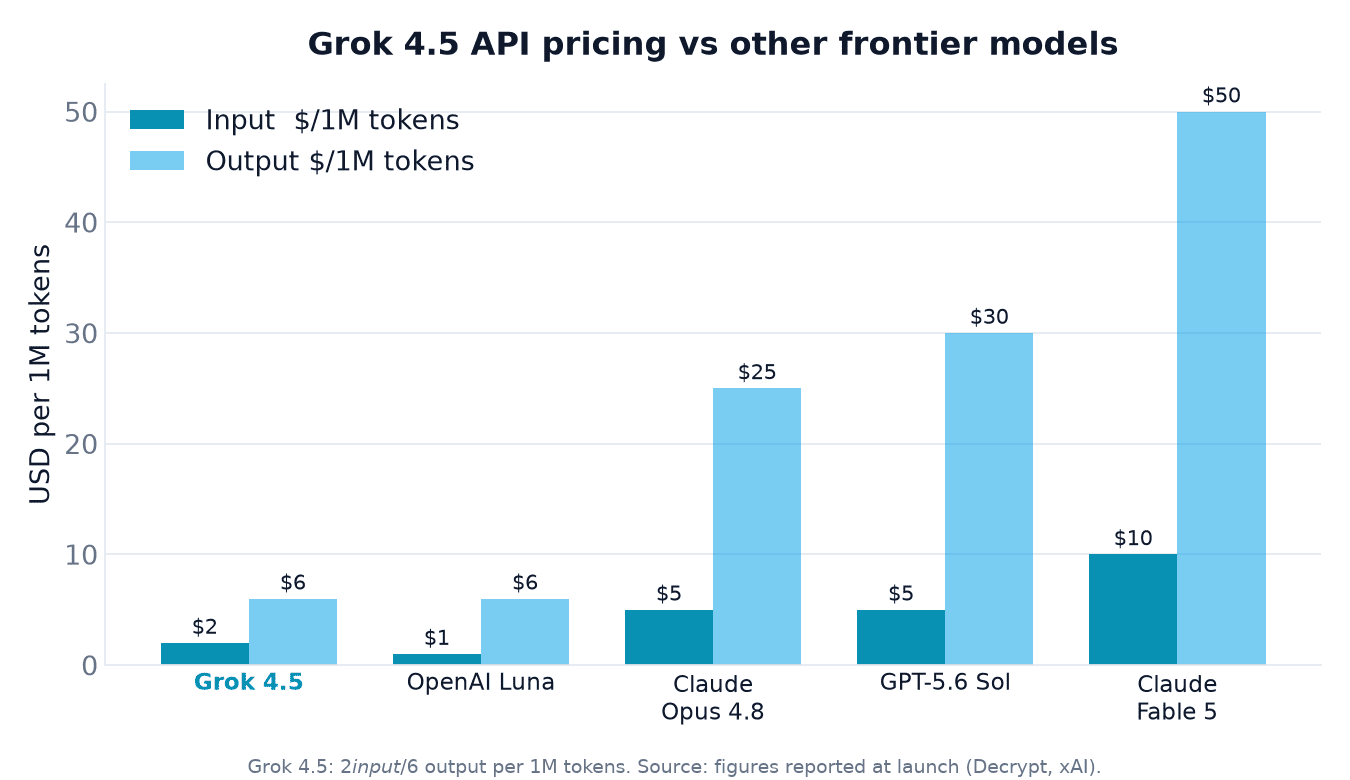
Higher-context pricing applies once a request crosses 200,000 tokens, so long-document workloads should budget for that tier separately. Per Decrypt’s coverage of the launch, this is cheaper than Claude Opus 4.8 ($5/$25 per million tokens) and GPT 5.6 Sol ($5/$30 per million tokens), which is one reason cost-sensitive teams are evaluating it as a drop-in alternative.
How to spend less
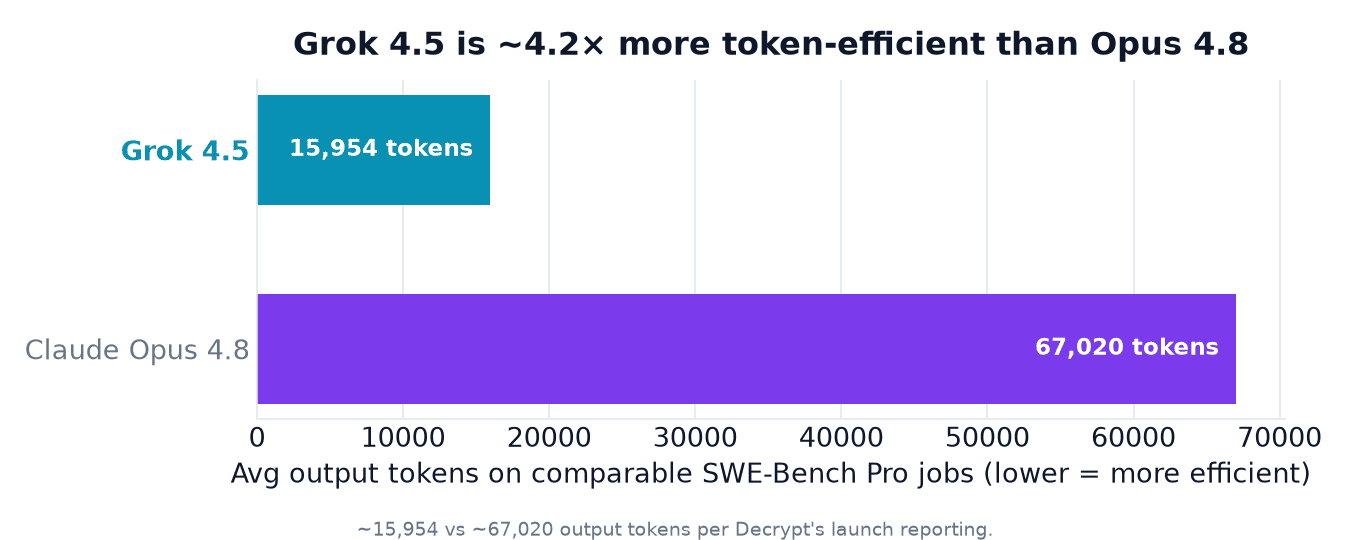
Prompt caching can cut effective cost by 60-80% on requests that reuse the same system prompt or long context repeatedly. Grok 4.5 also tends to be markedly more token-efficient than some competitors on equivalent tasks — averaging around 15,954 output tokens versus Opus 4.8’s roughly 67,020 on comparable SWE-Bench Pro jobs, a 4.2x gap per Decrypt’s reporting — which lowers the real bill even before caching is factored in. A few practical levers:
- Cache long, repeated system prompts and reference documents instead of resending them.
- Cap
max_tokenson responses where you don’t need long output. - Route only the hardest tasks to configurable higher reasoning depth, and keep routine calls lighter.
- Watch the 200,000-token threshold — requests above it move to higher-context pricing.
Rate limits and quotas
Rate limits decide whether the API can handle production traffic without throttling, so it’s worth checking them before architecting around a fixed request pattern.
Default limits
Per xAI’s documentation, the default limits are 150 requests per second and 50,000,000 tokens per minute, with the model served at roughly 80 tokens per second. These figures can vary by account tier, so check your console dashboard for the numbers that actually apply to your key, and treat the published defaults as a starting point rather than a guarantee.
Quick code example
A minimal working call needs three things: your key as an environment variable, the base URL swapped to xAI’s endpoint, and the grok-4.5 model id.
Python (OpenAI SDK)
import os
from openai import OpenAI

client = OpenAI(
 api_key=os.environ["XAI_API_KEY"],
 base_url="https://api.x.ai/v1",
)

response = client.chat.completions.create(
 model="grok-4.5",
 messages=[
 {"role": "system", "content": "You are a helpful assistant."},
 {"role": "user", "content": "Explain the Grok 4.5 API in two sentences."},
 ],
)

print(response.choices[0].message.content)
curl
curl https://api.x.ai/v1/chat/completions \
 -H "Content-Type: application/json" \
 -H "Authorization: Bearer $XAI_API_KEY" \
 -d '{
 "model": "grok-4.5",
 "messages": [
 {"role": "system", "content": "You are a helpful assistant."},
 {"role": "user", "content": "Explain the Grok 4.5 API in two sentences."}
 ]
 }'