
Explore Grok 4.5: Free chat · Model · Features · API · Pricing · How to use · Use cases · vs GPT-5 · vs Claude
Grok 4.5 Use Cases: What It Actually Does (With Real Examples)
Grok 4.5 is xAI’s flagship model, launched July 8, 2026, and built for coding, agentic tasks, and knowledge work. You can chat with Grok 4.5 free and try any of the cases below yourself, using the same prompts described here.
This page walks through eight concrete things Grok 4.5 is good at, each with a real example, so you know exactly when to reach for it instead of a general-purpose chatbot.
Coding & debugging
Grok 4.5 excels at coding because it was trained specifically on real engineering work rather than generic Q&A. xAI trained it alongside Cursor, running reinforcement learning across hundreds of thousands of multi-step software engineering tasks, and the result is a model that handles challenging Rust and C/C++ work, not just boilerplate Python.
Fix a bug and explain it. Paste a broken function — something as simple as function median(a){a.sort();return a[a.length/2]} — and Grok 4.5 finds the bug, fixes it, and explains why the original logic failed. That combination of correction plus explanation is what makes it useful for learning, not just patching code blind.
Build an app from one prompt. In one xAI demo, a single prompt produced a working Three.js solar-system simulation with adjustable time controls and realistic orbital mechanics — an end-to-end functional app, not a code snippet needing assembly. On the DeepSWE benchmark, Grok 4.5 scores 62.0% pass@1, and it now runs as the default model inside Grok Build and is available in Cursor on all plans, according to xAI’s official announcement.
Where Grok 4.5 shows up for coding work:
- Default model inside Grok Build
- Available in Cursor on all subscription plans
- Reachable via the xAI API for custom tooling
- Runs through gateways like OpenRouter, Vercel, and Cloudflare
Research & real-time information
Unlike a model limited to its training cutoff, Grok 4.5 ships with built-in web search, X (Twitter) search, and code execution tools. That matters for any task where the answer depends on what’s happening right now, or where you need to synthesize a pile of source material rather than recall a fact.
Current-events question with live sources. Ask what people are saying about a product launch today, and Grok 4.5 can search X in real time instead of guessing from stale training data. The official xAI docs list these built-in tools as native, available across the API, Grok Build, and Cursor:
- Web search
- X search
- Function calling
- Code execution
Literature review across long documents. Feed it several research papers and ask for a review that reconciles different methodologies and flags gaps between them. TechCrunch specifically frames Grok 4.5 as a workhorse for this kind of research and knowledge work, alongside coding and office tasks.
Writing & content
Word processing is one of the more mundane but high-frequency uses of a frontier model, and Grok 4.5 handles it directly inside Microsoft Word through xAI’s Office add-in rather than requiring a copy-paste workflow.
Draft, restructure, and polish. Ask for a first draft of an article, then have Grok 4.5 tighten the structure and adjust the tone without rewriting from scratch. It writes clear, structured prose directly inside Word, which TechCrunch calls out as one of the reasons it functions as a workhorse for routine knowledge work.
Data analysis
Grok 4.5’s code-execution tool turns it from a model that describes calculations into one that actually runs them, which matters most in spreadsheet and quantitative work.
| Task | What Grok 4.5 does |
|---|---|
| Financial modeling | Builds multi-sheet Excel models with live web research, working formulas, and annotation notes |
| Statistical checks | Verifies statistical assumptions before calculations run |
| Physics/math problems | Solves multi-step problems using the code execution tool |
Example: build a financial model in Excel
Ask Grok Build to “build a discounted cash flow model for this company,” and it assembles a multi-sheet Excel workbook — pulling live web research for inputs, wiring up working formulas across sheets, and leaving sticky notes behind to explain assumptions. It can also verify statistical assumptions and run calculations through its built-in code-execution tool rather than just estimating numbers in prose.
Example: check the math behind a claim
Beyond spreadsheets, the same code-execution tool lets Grok 4.5 solve multi-step physics or statistics problems and show the actual computation, not just a plausible-sounding answer.
Image & visual understanding
The Grok model line is multimodal, accepting image inputs alongside text, which is useful for reading charts, diagrams, or error screenshots without transcribing them by hand.
Explain a chart or screenshot. Upload a screenshot of an error message or a chart from a report and ask what it means. Because the underlying Grok architecture is multimodal, it can reason over the image directly. The exact scope of image features exposed specifically in the 4.5 release is worth confirming against the current docs before relying on it for precision tasks like OCR of dense tables.
Learning & tutoring
Reasoning effort in Grok 4.5 is configurable — low, medium, or high, with high set as the default — which means you can trade depth for speed depending on whether you want a fast answer or a fully worked-through explanation.
Here’s how to get a step-by-step walkthrough out of it for a hard problem:
- State the problem in full, including any constraints or given values.
- Ask explicitly for reasoning to be shown, not just the final answer.
- If speed matters more than depth, request low or medium reasoning effort.
- For a genuinely hard multi-step problem — physics, statistics, a proof — leave reasoning at the default high setting.
- Review each step and ask it to re-derive any part that seems shaky.
- Ask for a summary of the method once the full solution checks out.
Work through a hard problem step by step. A prompt like “solve this multi-step physics problem and show your reasoning” plays directly to that configurable reasoning depth, making Grok 4.5 usable as a tutor rather than just an answer engine.
Business productivity
Grok 4.5 integrates with Microsoft Office — Word, PowerPoint, and Excel — through dedicated add-ins, and xAI built it to handle the kind of finance and legal work that shows up in day-to-day business operations.
It is an Opus-class model, but faster, more token-efficient and lower cost.
Elon Musk
Draft a quarterly business review deck. Ask for a 5-slide outline, and Grok 4.5 uses native PowerPoint shapes to build diagrams and design slide content, rather than dumping bullet points into a plain template. On the finance and legal side, xAI reports it ranks #1 on Harvey’s Legal Agent Benchmark (a result from xAI’s own launch materials, not yet an independently verified public leaderboard entry), which is part of why xAI positions it for business and legal workflows alongside coding.
The Office integration spans three apps:
- Word — structured prose and document drafts
- PowerPoint — native-shape diagrams and slide design
- Excel — multi-sheet formula models with live web research
Everyday questions & automation
Beyond single-shot answers, Grok 4.5 chains tools together to run multi-step tasks autonomously — this is what “agentic” means in practice: the model decides which tool to call next based on what the previous step returned.
A multi-step task run end to end. A prompt such as “research three vendors, compare pricing, and draft an email with a recommendation” has Grok 4.5 combine web search and function calling to move through research, comparison, and drafting without a human re-prompting it at each step. It’s accessible to X Premium and SuperGrok subscribers, with free trial usage available inside Grok Build and Cursor.
Everyday automation tasks that fit this pattern:
- Comparing vendor pricing and summarizing the trade-offs
- Drafting a follow-up email based on research results
- Chaining a web lookup into a calculation via code execution
- Answering a quick factual question that needs a live source
Pricing & how it compares
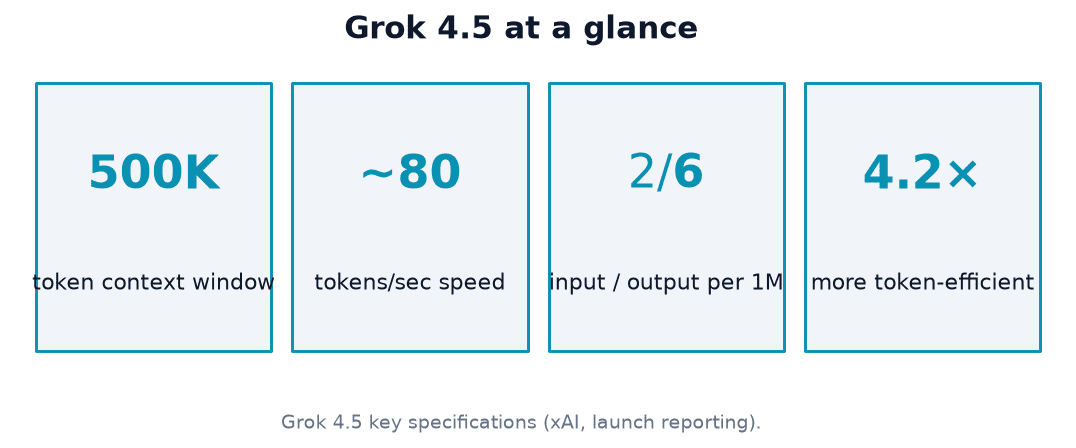
Running any of the cases above through the xAI API costs $2 per million input tokens and $6 per million output tokens — compared to Anthropic’s Opus 4.7 at $5 input / $25 output per million tokens. xAI serves Grok 4.5 at 80 tokens per second with roughly twice the token efficiency of comparable leading models, meaning it typically solves tasks in fewer steps.
| Model | Input (per 1M tokens) | Output (per 1M tokens) |
|---|---|---|
| Grok 4.5 | $2.00 | $6.00 |
| Opus 4.7 (Anthropic) | $5.00 | $25.00 |
Musk described the pricing-to-capability trade-off directly: “roughly comparable to Opus 4.7, but much faster,” per TechCrunch’s coverage of the launch. EU availability was expected in mid-July 2026 at launch, so check the official docs for current regional rollout status before assuming it’s live in your market.