
Explore Grok 4.5: Free chat · Model · Features · API · Pricing · How to use · Use cases · vs GPT-5 · vs Claude
How to Use Grok 4.5: A Complete Practical Guide (2026)
Grok 4.5 is xAI’s latest flagship model, built for coding, agentic tasks and fast, high-context conversations. You have four ways to try it: inside the X app, at grok.com, through the xAI API, or with the free Grok 4.5 chat online on this site. This guide walks through access, prompting, real-time search, coding, image understanding and the API so you can pick the setup that fits your workflow.
What Is Grok 4.5?
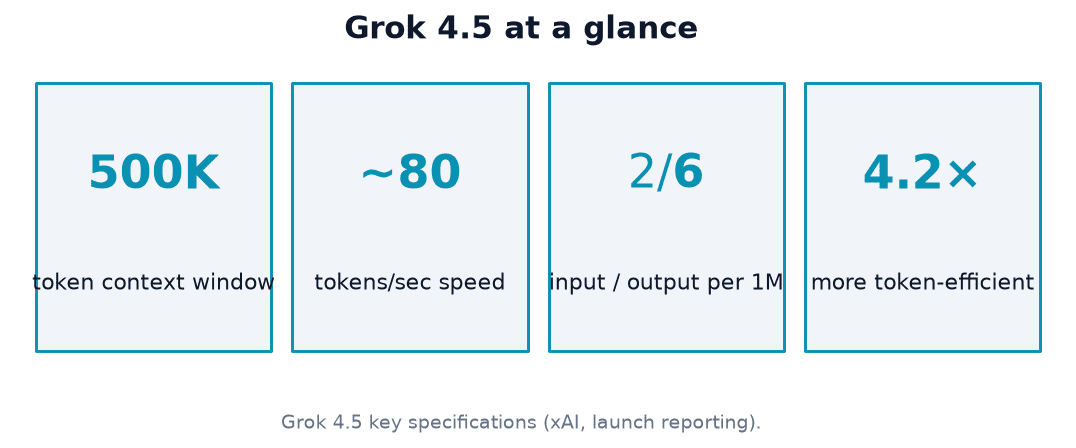
Grok 4.5 is xAI’s smartest model to date, launched July 8, 2026, and built to excel at coding, agentic tasks and knowledge work. It runs at fast-model speeds of roughly 80 tokens per second, with about twice the token efficiency of comparable leading models, and offers a large context window of around 500,000 tokens. xAI trained it across tens of thousands of NVIDIA GB300 GPUs, with a heavy focus on reinforcement learning over multi-step software engineering tasks — one reason the official xAI announcement frames it as the company’s strongest engineering model yet.
That combination of speed and reasoning depth is why xAI’s own release notes describe it this way:
Grok 4.5 is xAI’s smartest model built to excel at coding, agentic tasks, and knowledge work.
xAI, “Introducing Grok 4.5”
The model sits behind several products at once — the X app, grok.com, Grok Build, Cursor and the xAI API — rather than a single interface, so the fastest way to use it depends on what you’re trying to do.
Ways to Access Grok 4.5
There are several routes into xAI’s smartest model, and most people end up using more than one depending on the device and task at hand.
- The X app, for quick questions grounded in live posts
- grok.com and the iOS/Android apps, for a full chat interface
- The free chat on this site, for a no-signup try before committing to a subscription
- Grok Build and Cursor, where Grok 4.5 is available for developers building software
- The xAI API, for integrating the grok-4.5 model into your own product
On the X app
Grok is built into X (formerly Twitter) — open it from the sidebar or the Grok chat icon while logged in. This entry point is particularly good for quick questions grounded in real-time X posts, since the model has a live connection to the platform’s public stream.
On grok.com and the mobile apps
Go to grok.com on the web or install the iOS/Android app, then sign in with an X or email account to sync your conversations across devices. This is the fullest version of the Grok chatbot interface, with DeepSearch, Think mode and file uploads all available in one place.
Via the xAI API and Grok Build
Grok 4.5 is the default model in Grok Build and is available in Cursor on all plans, so developers already working in those tools get it automatically. Anyone who wants direct programmatic access grabs a key at console.x.ai — the full setup is covered in the API section below.
Is Grok 4.5 Free? Tiers, Limits and Pricing
Grok 4.5 is usable for free, but the free tiers are capped, and heavier use requires a paid plan or API credits.
| Access path | Cost | Typical limit |
|---|---|---|
| grok.com free Basic tier | Free | Limited daily messages |
| Grok on X (free account) | Free | ~10 messages per rolling 2-hour window |
| SuperGrok subscription | $30/month or $300/year | Higher message limits |
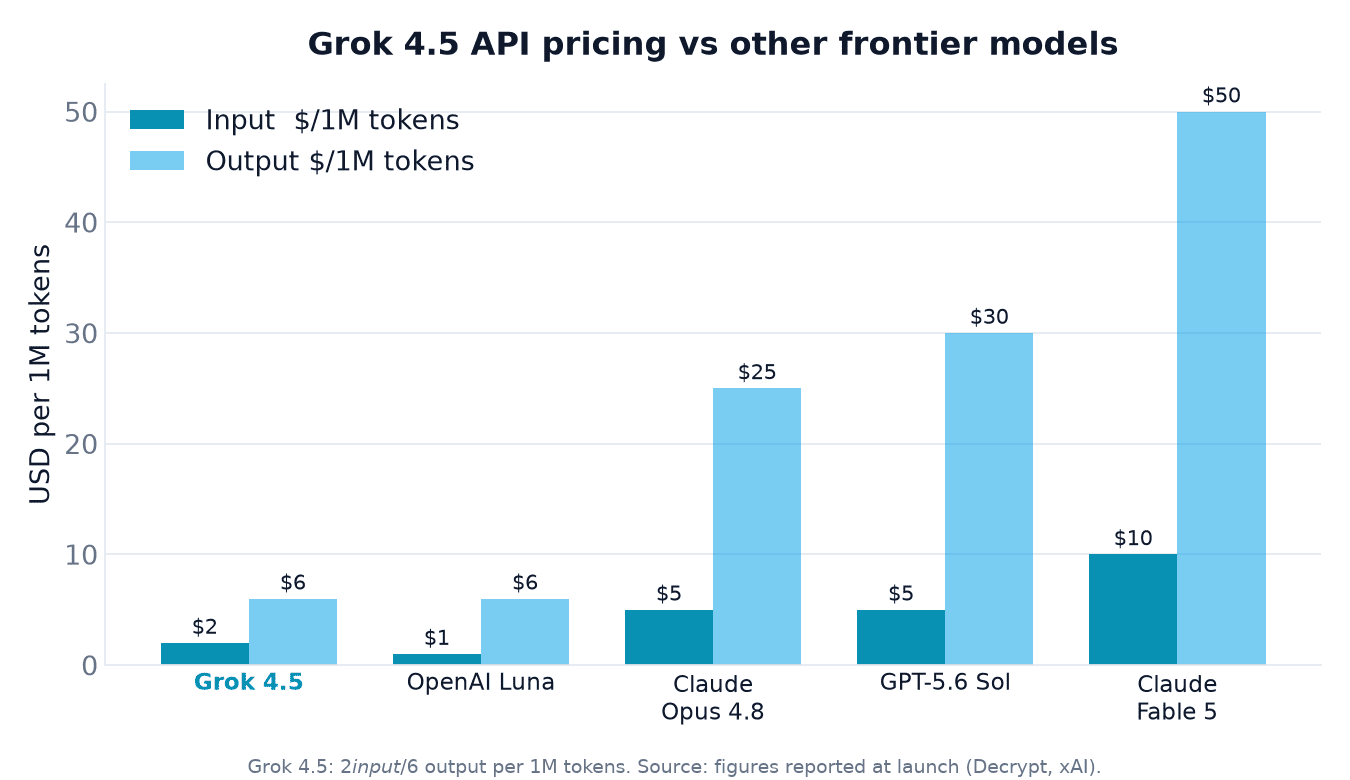
| xAI API | $2 per million input tokens, $6 per million output tokens | Pay-as-you-go |
| Grok Build / Cursor | Free for a limited time at launch | Subject to change |
Free access
A free Basic tier exists on grok.com, and free users on X are capped at roughly ten messages per rolling two-hour window. These limits change fairly often, so treat the numbers above as a starting point rather than a fixed ceiling.
Paid subscriptions and API pricing
SuperGrok runs about $30 per month or $300 per year for higher limits and priority access. Through the API, Grok 4.5 is priced at $2 per million input tokens and $6 per million output tokens, which is the figure developers should budget against when estimating usage costs. EU availability was still pending at launch, with wider rollout expected by mid-July 2026.
Writing Effective Grok Prompts
Be specific about the outcome you want. Vague prompts like “AI news” force Grok to guess at scope, format and depth. State the goal, add relevant context and constraints, and specify the output format — for example, “Summarize the top 3 AI news stories from today with sources” gives the model a concrete target instead of an open-ended topic.
Pick a response style that matches the task. Grok offers a “Fun” style with humor and sarcasm alongside an “Accurate” style built for direct, low-noise answers. Switching to Accurate is worth doing whenever you’re pulling facts, numbers or anything you plan to act on, since it trims the personality flourishes that Fun mode adds.
| Response style | Tone | Best for |
|---|---|---|
| Fun | Humor, sarcasm, personality | Casual chat, brainstorming |
| Accurate | Direct, low-noise | Facts, research, anything you’ll act on |
A prompt that works well usually includes:
- The goal — what you actually want back
- Context — background the model needs but wouldn’t otherwise have
- Constraints — length, tone, format, sources required
- The output format — a table, a list, a short paragraph, code
Using Real-Time X and Web Search (DeepSearch)
DeepSearch is Grok’s agentic research mode, and it works differently from a single-shot answer.
How DeepSearch works
DeepSearch splits your query into sub-queries, runs parallel searches across the web and X, follows fresh links as it goes, and returns a structured, cited report rather than a single paragraph. For longer research runs that need to dig deeper across more sources, DeeperSearch extends the same process. According to learnprompting.org’s guide to Grok, the Research button in the interface pre-writes the beginning of your prompt and toggles DeepSearch on automatically, which is a fast way to trigger the mode without typing a full research request.
Real-time X advantage
Grok’s live connection to X’s public post stream is what separates DeepSearch from a generic web search tool — it can surface reactions, breaking news and trending topics minutes after they happen, not just indexed pages from days earlier.
Think Mode and Reasoning
Think mode shows the model’s step-by-step reasoning before it gives a final answer, which is most useful for multi-step problems where showing the work improves accuracy — coding, math and science questions in particular. For a quick factual lookup, Think mode is usually unnecessary overhead; for a tricky bug or a multi-step proof, it noticeably changes the quality of the output.
On the API, reasoning effort is configurable so developers can trade latency for depth depending on how hard the task actually is:
- Low — fastest response, minimal reasoning chain
- Medium — balanced default for everyday coding and analysis
- High — longest reasoning chain, best for hard multi-step problems
Coding Help with Grok 4.5
Grok 4.5 handles challenging Rust and C/C++ tasks and can build end-to-end apps from a single prompt, which is why it’s the default model in Grok Build and works across Cursor plans. Beyond app scaffolding, it also handles office-style work — spreadsheets, presentations and documents — where the task is less about raw code and more about structuring information correctly.
From snippets to full apps
The model can go from a short natural-language description straight to a working, deployable application, handling routing, styling and basic state without requiring a line-by-line spec. That makes it a reasonable first pass for prototypes, even before a developer refines the generated code by hand.
Using it inside an existing workflow
Because Grok 4.5 is the default model in Grok Build and available in Cursor, teams that already use those tools don’t need a separate setup step — switching models in the editor is enough to start using Grok 4.5 for autocomplete, refactors and larger multi-file changes.
Image Understanding and File Uploads
Grok 4.5 is multimodal, so it can read screenshots, charts, scanned documents and photos, not just text you paste in. To use it, open a chat on grok.com, the X app, or the free chat on this site, click the upload or attachment icon, select a file from your device, and add a prompt describing what you want Grok to do with it.
Supported inputs span several formats:
- Documents: PDF, DOCX, TXT, MD, CSV, JSON
- Code files: Python, JavaScript and similar formats
- Images: PNG, JPEG, GIF, WebP
Note that Aurora is xAI’s separate image-generation model — it creates images from text prompts, which is distinct from Grok 4.5’s ability to understand and describe images you upload.
Using the Grok 4.5 API
Developers integrating Grok 4.5 directly work with the xAI API, which is deliberately built to be a near drop-in replacement for existing OpenAI or Anthropic integrations.
Quick start
- Sign up for an account at console.x.ai
- Add billing credits to the account
- Generate an API key from the console
- Set your base URL to https://api.x.ai/v1
- Set the model parameter to grok-4.5
- Send a test request and confirm you get a valid response
Because the API is compatible with both the OpenAI and Anthropic SDKs, most existing integrations only need the base URL and model name changed — the request and response shapes stay familiar. Full parameter details, including reasoning-effort settings for Think mode, are documented at docs.x.ai.
Tips and Best Practices
Combine modes instead of using them in isolation. Think mode for reasoning and DeepSearch for research solve different problems, and stacking them on a genuinely hard question — one that needs both fresh information and multi-step logic — tends to outperform using either alone.
Watch your free-tier limits before you hit them mid-task. Running out of messages partway through a long research session is avoidable if you check whether you’re on the free Basic tier, the roughly ten-message X window, or a paid plan before starting something time-sensitive.
Double-check anything time-sensitive. DeepSearch pulls from live sources, but for decisions that matter, verify the underlying citation rather than treating the summary as final — the Accurate response style helps here since it prioritizes direct answers over embellishment.